Your own music library
Add tracks from files and folders, build playlists, mark your favorites, and back up your library.
 KaraVoco
For practice. For performance. For you.
A free music player with lyrics for your local tracks and backing tracks.
Find lyrics online. Change pitch without changing tempo.
Works best in Chrome
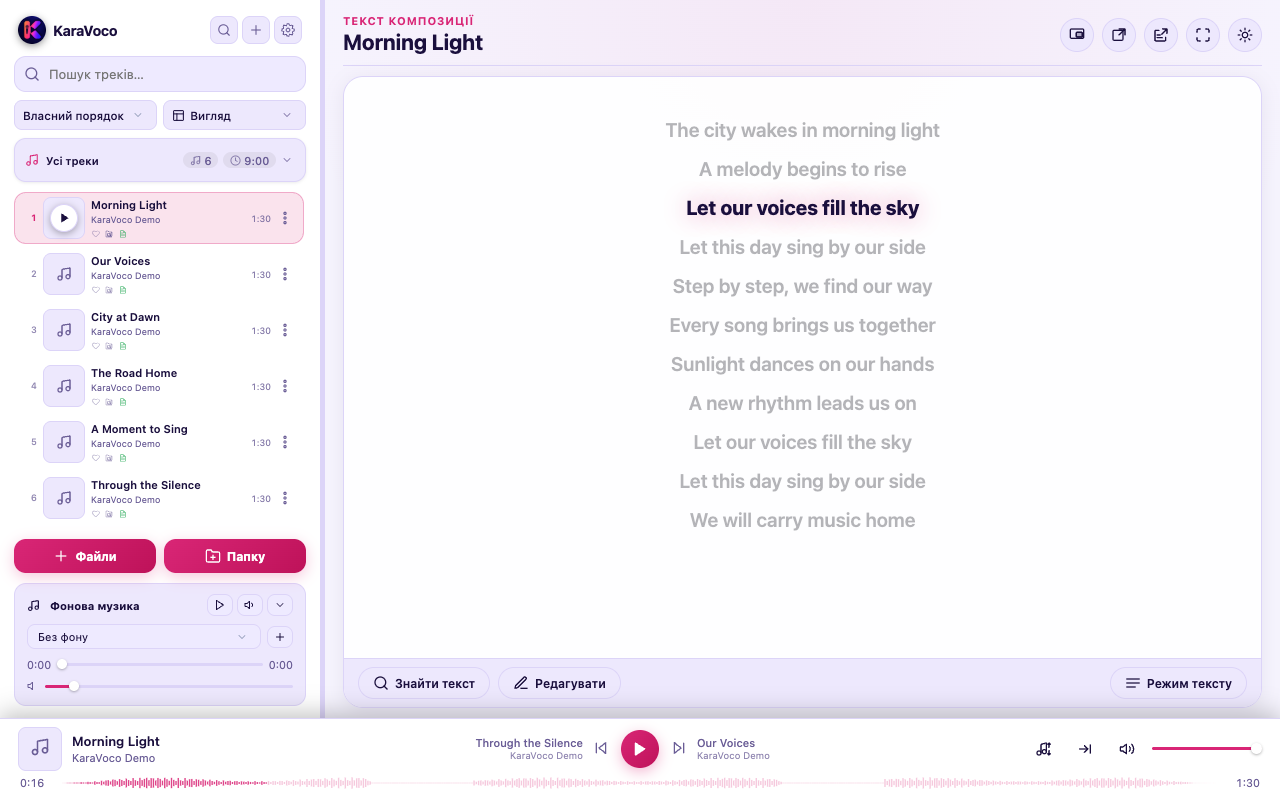
Made for your music
Listen, work through the tricky parts,
and rehearse. KaraVoco follows your lead.
Add tracks from files and folders, build playlists, mark your favorites, and back up your library.
Search for song lyrics online or add your own TXT or LRC files and edit the words. Follow highlighted, synchronized lyrics to stay on your line.
Adjust pitch by up to ±12 semitones and tempo from 0.25× to 2× independently. Your settings are saved for each track.
Smooth transitions between songs and a separate background track help keep the atmosphere going.
Open a compact mini player or move your lyrics into a separate window. Keep what you need in view.
Light and dark themes, track waveforms, visualizations, and lyric settings to fit your space.
One player. So many possibilities.
Computer, tablet, or phone — KaraVoco works on any modern device with a browser.
We recommend Chrome. Some features depend on your browser and device.


Getting started is easy
Visit player.karavoco.com in a modern browser.
Use your browser’s install option or add KaraVoco to your home screen.
Find KaraVoco among your apps. Add your own music and start singing.
From song lyrics to a comfortable key — practical guides to getting started.
Play local MP3s and search for song lyrics online in KaraVoco. Add your own plain text or synchronized LRC files and keep words in a separate panel.
Learn moreShift song pitch by ±12 semitones without changing speed. Slow down or speed up tracks from 0.25× to 2× while keeping your chosen pitch in KaraVoco.
Learn moreOpen KaraVoco in your browser or install it as a web app. Prepare your own tracks and lyrics for offline practice on a computer, tablet, or phone.
Learn moreA few answers
You can use KaraVoco right in a browser tab. Installing the web app gives you a convenient icon to launch it from your device.
Music primarily comes from local audio files on your device. Search for lyrics online or add your own TXT or LRC files. KaraVoco helps you organize your library and playlists and adjust playback.
Once the player has loaded and is ready for offline use, you can play tracks saved on your device. Finding lyrics and cover art requires an internet connection.
Yes. Add your track and lyrics: plain text to read along or a synchronized LRC file for highlighted lines. KaraVoco works with backing tracks for karaoke and learning songs.
Yes, the current player is free. Open it in your browser and add your own audio files. No registration is required to get started.
Your next track is waiting
Open. Add your music. Sing.